
Microsoft Copilot vs. ChatGPT for Business: Which to Choose in 2026
About this translation
Original publication dates and historical context are preserved. Images, embedded media, source documents and code examples remain in their original language.
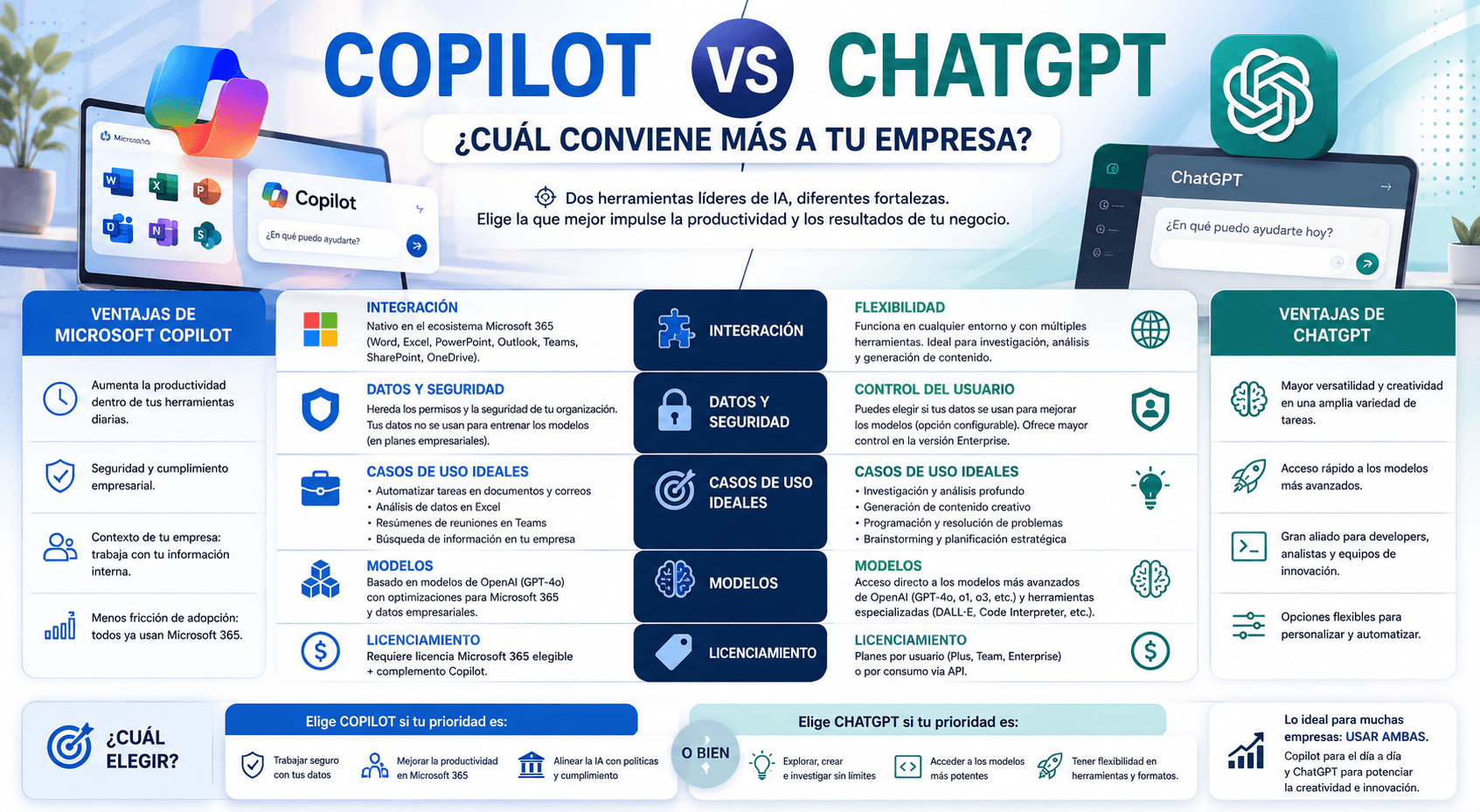
Adoption of generative AI in Latin American companies is accelerating, but many IT teams and digital leaders face the same dilemma: should they implement Microsoft 365 Copilot, which integrates with the existing Office stack, or adopt ChatGPT Enterprise, with greater flexibility and automation capabilities? This comparison examines both options using concrete criteria for teams in LATAM.
Comparative technical specifications
| Criterion | Microsoft 365 Copilot | ChatGPT Enterprise |
| Base model | GPT-4o + o3 mini (via Azure OpenAI, 2026) | GPT-4o and o3 (depending on subscription) |
| Price per user/month | USD 30 (requires M365 E3/E5 or Business Premium) | USD 30 standard / custom quotes for volumes >150 users |
| Office integration | Native (Word, Excel, Teams, Outlook) | Via plugins and Actions (not native) |
| Context limit | 128K tokens | 128K tokens |
| Data used for training | No (tenant data protected) | No (with Enterprise) |
| API for automation | Graph API + Power Platform | Direct OpenAI API |
| Custom GPT support | Copilot Studio (additional) | Internal workspace GPTs |
| Requires Microsoft infrastructure | Yes (M365, Azure AD) | No |
Microsoft 365 Copilot: who it is right for
Copilot is the natural choice if the company already operates within the Microsoft ecosystem (Teams, SharePoint, Exchange, Dynamics). Its value proposition is not the AI model (the same GPT-4o used by ChatGPT), but the depth of integration: it can read the user's email, access SharePoint documents, summarize Teams meetings in real time, and suggest Outlook actions based on calendar context.
Cases where Copilot wins
- Automatic summaries of Teams meetings with assigned action items.
- Draft email generation with the context of the entire thread.
- Data analysis in Excel using natural language (“show me customers who purchased more than 3 times in Q1 and whose average order value fell in Q2”).
- Semantic search across internal documents in SharePoint and OneDrive.
ChatGPT Enterprise: who it is right for
ChatGPT Enterprise offers greater flexibility and does not require being in the Microsoft ecosystem. It is the preferred option when the team needs to create custom workflows, use the API for its own integrations, or work with data from multiple sources outside SharePoint.
Cases where ChatGPT Enterprise wins
- Teams that need to create internal GPTs specialized by department (legal, finance, sales).
- Startups or companies with a heterogeneous technology stack (not centered on Microsoft).
- Projects requiring direct API integration to automate complex workflows.
- Analytics teams working with Python code, SQL, or unstructured data.
Security and compliance: the critical factor for LATAM
Both platforms guarantee that user data is not used to train models in their enterprise versions. However, there are relevant differences for companies subject to local regulations:
- Microsoft 365 Copilot: data remains within the Azure tenant. For companies with regulatory data localization obligations (Peru's Personal Data Protection Law, Law 29733), Microsoft offers data residency in Brazil (the nearest region with full availability in LATAM).
- ChatGPT Enterprise: OpenAI processes data on its own infrastructure in the United States (Azure). For strict localization requirements, this can be a regulatory obstacle.
Decision tree: which to choose
- Does your company use Microsoft 365 (Teams, Outlook, SharePoint) as its main stack? → Copilot is the natural candidate.
- Do you need to create specialized AI assistants for each department without technical configuration expertise? → Copilot Studio (in addition to Copilot).
- Does the team need advanced automation via API? → ChatGPT Enterprise.
- Is the budget limited and the team small (<20 people)? → ChatGPT Team (USD 25/user) may be sufficient.
- Are there regulatory requirements to keep data in Peru or Latin America? → Evaluate both options with the legal team before deciding.
Recommendation for most midsize companies in LATAM
For a company with 100–500 employees and an existing Microsoft stack, the most efficient roadmap in 2026 is: enable Microsoft 365 Copilot for teams with the highest volume of meetings and documentation (management, sales, operations), build 2–3 Copilot Studio agents for critical processes, and evaluate ChatGPT Enterprise or solutions based on open-source models according to the level of data control required.
Sources
- Microsoft. (2026). Microsoft 365 Copilot – Pricing and features. microsoft.com/es-es/microsoft-365/copilot
- OpenAI. (2026). ChatGPT Enterprise – Product Overview. openai.com/chatgpt/enterprise
- Gartner. (2026). Magic Quadrant for Conversational AI Platforms. gartner.com